The article
describes a personalization framework that has been designed and demonstrates a
functionality that can be plugged in Moodle e-learning platform to provide for
a pedagogical framework to achieve personalization of learning. The
functionality provides the teacher/mentor with the possibility to customize the
way he or she wants the system to offer personalization to the learner. Once
the settings are done, the system adapts the instruction given with respect to
the learner profile that is stored. It uses an adaptive algorithm to select the
most appropriate learning object for a given lesson. Personalization of the
system allows adaptation based on performance, preferred learning and cognitive
styles as well as cognitive controls. The student on the other has the possibility
to rate and comment on the lesson presented and their learning paths are stored
in the system. This provides the teacher/instructor with a method to evaluate
the outcome of providing personalization to the learners.
The Overall Framework in UML
The overall framework can be
represented the unified modelling language (UML) and the MOT Taxonomy
(Paquette, 2003) to model the pedagogical scripting of personalized learning
activities (individual or collective) and for the representation of the overall
framework. In the present situation, the MOT taxonomy (Paquette, 2003) has been
used to represent high-level knowledge model of the pedagogical scenario while
UML will be used as a conceptual model for the information technology
infrastructure.
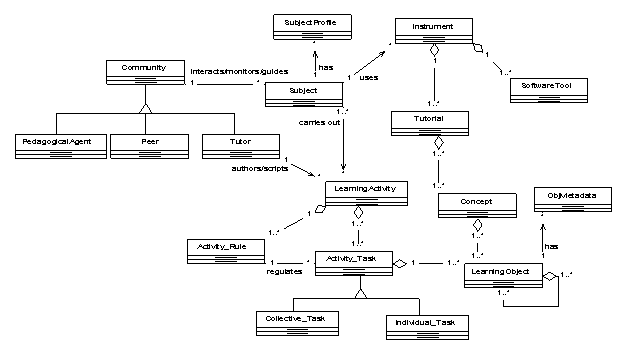
The subject is the learner who is engaged in a learning activity (object)
which is mainly a set of inter-related tasks that are to be carried out to
achieve a specific learning outcome or to develop specific competencies. The
concept of the instructional design specification is specific to an activity-based
conceptualisation of the learning process. This means that the specification is
not independent of the pedagogical approach which is geared towards a
competency-based learning design. Each
learning activity consists of a set of activity tasks which can be either
individual or collective. Each activity task is governed by a set of
pedagogical scripts in the form of rules set by the tutor who authors the
learning activity. The scripts will be personalized at a macro-level to fit the
group in case of a collective task, and at micro-level for individual tasks
based on the subject profile or learner information profile or simply learner
profile.
Each activity task takes the form of a set of personalised learning
objects aggregated and sequenced for each subject involved in the activity
task. To carry out the learning task, the subject will have access to a range
of mediating instrument as specified in the pedagogical script of the task. An
instrument can be a software tool, and/or tutorial on any relevant concepts for
the learning task or simple instructions on how to use the learning environment
and other artefacts depending on the pedagogical scenario being tackled. A
tutorial is an aggregation of a set of concepts which in turn are basically a
set of aggregated learning objects.
Implementation
in MOODLE LMS
A prototype implementation has been implemented as a series of MOODLE
“Blocks” and “Modules” in order to test its effectiveness in a mainstream
e-learning environment.
The following blocks were implemented:
· Learner
Profiling & Individual Learning Path
The learner profiling block allows the participants
to take the VAK and the LSQ surveys respectively. It can also include other
types of surveys depending on the type of profile that is needed for adaptation
purposes. The individual learning path block provides the
lecturer with a mini-report of the set of learning objects that are selected
for each learner based on his or her profile and the adaptation method
selected.

The following modules were implemented:
· Adaptive Mode Selection
The teacher can select in the course settings section whether to enable adaptive mode
or not. Further to this, the teacher selects the adaptation algorithm (Santally & Senteni
2006) (there are two variants).

· Learning Object Profiling and Sequencing
This module allows the teacher to sequence the learning objects and to add respective metadata for the adaptation/personalization process. The learning object profiling mechanism is initially based on some degree of intuition and subjectivity. This process is usually carried out by the instructional designer and/or the teacher/lecturer and is therefore largely based on their previous experience and perception.

Discussion and Conclusion
This research is ongoing and
a number of milestones have been reached. The adaptation framework for the
design of personalized learning environments has been set up. The learning
design framework consists of a lifecycle for the pedagogical scripting of
learning activities and techniques to be used to provide for a personalized
learning experience. So far only a
prescriptive approach has been adopted to the elaboration of the pedagogical
scripting life cycle. Further refinements are needed to improve the overall
learning design framework. The learning design framework can be seen as
consisting of:
· Principal actors (Lecturer,
Learner, Learning/Instructional Designer, Learner-Support Agent) of the
activity system.
·
A flexible instructional
design method using an activity-theoretical approach to model the
people-process-technology triad as an activity system. The method consists of:
o A pedagogical scripting lifecycle for learning
activities
o Instructional conception of multiple representations
of learning objects
o Adding appropriate metadata to the learning objects
by instructional designers
o Sequencing of learning objects
o Initialization of a learner profile
·
A customizable adaptation
algorithm based on a fuzzy approach for learning object selection appropriate
to a particular learner profile.
·
Implementation in the MOODLE
e-learning platform as a personalization block which can be applied to online
courses.
The whole framework will be
set under experimentation to observe the effects on the learning experience of
online learners.


